# 关于前端配置代理的问题
首先明确一下前提:
假设后端服务部署在10.0.0.1:8080上,在不开启跨域的前提下,我们没法直接访问
比如express服务不开启cors(不启用app.use(cors))
一般通过代理的方式来访问后端服务
比如vite server proxy的设置
server: {
		proxy: {
		    "/adms": {
		        target: "http://10.0.0.1:8080",
		        secure: false,
		        rewrite: (path) => path.replace(/^\/adms/, ""),
		    },
		},
},
2
3
4
5
6
7
8
9
当接口匹配到/adms时,就会代理到http://10.0.0.1:8080
这里rewrite的作用是当匹配到对应请求时,将/adms替换为"",至于为什么要替换成"",这里是因为后端的api并不是以/adms开头的
# 经过代理的请求在浏览器中显示的还是原来的Request URL
server: {
    port: 9001,
    proxy: {
      '/proxyApi/': {
        target: 'http://localhost:3000',
        changeOrigin: true,
        rewrite: (path) => path.replace(/^\/proxyApi/, '')
      }
    }
  }
2
3
4
5
6
7
8
9
10
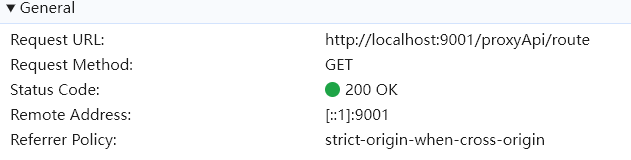
比如我上面将带有/proxyApi/的请求代理到http://localhost:3000,并且通过rewrite去除掉/proxyApi,最终请求的地址为http://localhost:3000/route,但是浏览器中显示的还是localhost:9001/proxyApi/route,这是前端服务器所在的地址。
10.0.0.1通过设置nginx,访问10.0.0.1:80/adms时反代到10.0.0.1:8080
所以我们所有的请求都会通过中间层转换成直接访问后端的服务
第二种:
我们也可以代理到nginx,然后nginx再代理到后端服务
如果要代理到nginx,我们就不能再访问端口了,中间件最终要访问的地址应是10.0.0.1:80/adms,这样才会命中nginx的规则
server: {
    proxy: {
        "/adms": {
            target: "http://10.0.0.1",
            secure: false,
            rewrite: (path) => path.replace(/^\/adms/, "/adms"),
        },
    },
},
2
3
4
5
6
7
8
9
# changeOrigin配置
假设你的 Vue 应用在 http://localhost:8080 上运行,后端 API 服务在 http://127.0.0.1:3000 上运行。前端通过代理来发送请求:
module.exports = {
  server: {
    port: 10001,
    proxy: {
        '/test': {
            target: 'http://127.0.0.1:3000',
            changeOrigin: true,
            rewrite: (path) => path.replace(/^\/test/, '/test'),
        }
    }
  },
};
2
3
4
5
6
7
8
9
10
11
12
# 请求的变化:
- 客户端原始请求:
- URL:
http://localhost:8080/api/users - Origin:
http://localhost:8080
- URL:
- 代理后请求(
changeOrigin: true时):- URL:
http://api.example.com/users - Origin:
http://api.example.com(代理服务器将Origin修改为目标地址)
- URL:
如果 changeOrigin 为 false,那么后端服务器会收到带有原始 Origin 的请求(即 http://localhost:8080)。有些后端服务会对 Origin 进行严格校验,因此可能会拒绝来自不同域名的请求,这时就需要将 changeOrigin 设置为 true。
# Vite proxy覆盖问题
Vite server proxy 的路径匹配是按照配置顺序的。如果两个规则都匹配了同一个路径,将使用第一个匹配的规则。
比如第一个匹配路径 "/api",而第二个匹配路径 "/api/data",则使用/api
# Vite的代理配置模糊匹配
Vite 的 proxy 配置是基于 [path-to-match] 的键值对方式,它支持使用 RegExp (正则表达式) 来实现模糊匹配。
比如下面这个配置:
'^/agent/proxyApi/flames-agent-manager/.*prompts': {
  target: 'http://10.1.196.177:30032/',
    // changeOrigin: true,
    rewrite: (path) => path.replace(/^\/agent\/proxyApi\/flames-agent-manager/, ''),
      headers: { cookie },
        configure: (proxy, options) => {
          proxy.on('proxyReq', (proxyReq, req, res) => {
            const target = options.target
            console.log('target: ', target);
            const protocol = proxyReq.protocol || 'http:'
            proxyReq.setHeader('SKYBOX_TOKEN_USER_KEY', 'eyJ0ZW5hbnRJZCI6IjMxNDk0OGMzLTcyYmQtNDc0MS1hNWU1LWY0ZTI4ZTBlYTI0YyIsInRlbmFudE5hbWUiOiLmmJ/ngavmmbrog73kvZPlubPlj7Ao56ef5oi3KSIsImlkIjoiNjc0MDcyNzQtMWZlMS00ZGU4LWJmYmQtODliMTk4YWE4NTJlIiwiYWNjb3VudCI6ImFkbWluIiwibmFtZSI6IuW5s+WPsOeuoeeQhuWRmCIsInR5cGUiOjEsInN0YXR1cyI6MSwib3JnSWQiOiItMSIsInJvbGVzIjpbIkZMTV9TWVNfREFUQV9BRE1JTiIsIkZMTV9TVVBFUl9BRE1JTiIsIkZMTV9BRE1JTiJdLCJhcHBDb2RlIjoiZmxhbWVzLWFnZW50In0=')
            console.log(
              '[Proxy Debug] target:',
              `${target.replace(/\/$/, '')}${proxyReq.path}`
            )
          })
        },
},
2
3
4
5
6
7
8
9
10
11
12
13
14
15
16
17
18
其中还涉及到了configure的使用
# Vite proxy bypass的用法与作用
# 什么是 bypass
在 Vite 的 server.proxy 配置里,通常用来转发请求:
'/agent/domain.json': {
  target: DEV_URL,
  bypass: (req, res, proxyOptions) => {
    const json = fs.readFileSync('./dev-config/domain.json', 'utf-8')
    res.setHeader('Content-Type', 'application/json')
    res.end(json)
    console.log('req.url: ', req.url);
    return req.url
  }
},
2
3
4
5
6
7
8
9
10
# 智能体开发中的vite代理
首先是pdfjs代理
'/pdfjs/': {
  target: DEV_URL,
  secure: false,
  changeOrigin: true
}
2
3
4
5
# 设置secure: false导致Websocket请求代理失败
在开发中发现vite proxy设置了secure: false后Websocket请求就代理失败,仍是localhost
首先我们要知道secure: false 的作用是:
🔹当目标服务器是 HTTPS(或 WSS)并且证书无效时,仍然允许代理连接。 例如自签名证书或测试环境证书。
也就是说:
secure: true(默认) → 只接受有效的证书secure: false→ 忽略证书验证
# 问题根源
当你代理 WebSocket(ws:// 或 wss://) 时,secure: false 的行为依赖于目标协议:
| target 协议 | secure 设置 | 说明 |
|---|---|---|
ws://(非加密) | ✅ 不需要 | 无影响 |
wss://(加密) | ⚠️ 若证书无效时才用 secure: false | 必须配合 changeOrigin: true |
http:// → ws:// | ❌ secure 不生效 | 无意义 |
https:// → wss:// | ⚠️ 若证书不可信则需要 secure: false | 否则握手失败 |
问题出现的典型情况是:
- 你目标服务其实是
ws://(非加密), - 但设置了
secure: false,此时代理模块以为你走的是wss://,结果反而破坏握手。
# 解决方案
✅1. 如果你的目标是 ws://(非加密)
👉 不要设置 secure: false。
{
  target: 'ws://10.1.205.53:30032',
  ws: true,
  changeOrigin: true,
}
2
3
4
5
✅ 2. 如果你的目标是 wss://(加密)
👉 可以保留 secure: false(如果目标证书不受信任),但要加上:
{
  target: 'wss://10.1.205.53:30032',
  ws: true,
  changeOrigin: true, // 👈 关键
  secure: false, // 允许自签名证书
}
2
3
4
5
6
changeOrigin: true 可以让代理在握手时伪装 Host 头,从而避免某些服务端严格校验。