# 1.压缩代码
webpack打包时默认会去除注释
# uglifyjs-webpack-plugin
(opens new window) GitHub (opens new window)
# webpack打包时去除console.log
webpack提供了UglifyjsWebpackPlugin (opens new window)
# uglifyOptions (opens new window)
[
  new UglifyJsPlugin({
    uglifyOptions: {
      ie8: false, //启用IE8支持,默认false
      ecma: 8,	//支持的ECMAScript的版本(5,6,7或8)。影响parse,compress&&output选项。默认undefined
      parse: {...options}, //其他解析选项 默认{}
      mangle: {
        ...options,
        properties: {
          // mangle property options
        }
      }, //启用名称处理(有关高级设置,请参阅Mangle属性,与⚠️一起使用)
      output: {
        comments: false,
        beautify: false,
        ...options
      }, //其他输出选项(默认设置已针对最佳压缩进行了优化)默认{}
      compress: {...options}, //其他压缩选项。默认true
      warnings: false //显示警告。默认false
    },
    sourceMap: false //sourceMap选项。默认false。如果希望指定源地图选项,则传递一个对象。
  })
]
2
3
4
5
6
7
8
9
10
11
12
13
14
15
16
17
18
19
20
21
22
23
# compressOption (opens new window)
compress:{
  drop_console: false, // 删除console.* 函数调用 去除控制台日志,如果是想要删除console.log,推荐使用pure_funcs
  pure_funcs: ['console.log'] // 这会删除console.log
}
2
3
4
# terser-webpack-plugin
terserOptions
module.exports = {
  optimization: {
    minimize: true,
    minimizer: [
      new TerserPlugin({
        terserOptions: {
          ecma: undefined,
          parse: {},
          compress: {},
          mangle: true, // Note `mangle.properties` is `false` by default.
          module: false,
          // Deprecated
          output: null,
          format: null,
          toplevel: false,
          nameCache: null,
          ie8: false,
          keep_classnames: undefined,
          keep_fnames: false,
          safari10: false,
        },
      }),
    ],
  },
};
2
3
4
5
6
7
8
9
10
11
12
13
14
15
16
17
18
19
20
21
22
23
24
25
26
去除console.log
compress: {
  // drop_console: true, // 这会删除console.*,如果只想删除console.log,请使用pure_funcs
  pure_funcs: ['console.log'] // 这会删除console.log
}
2
3
4
# 2.压缩文件
# 压缩svg
使用mini-svg-data-uri (opens new window)
# SVG Sprite 雪碧图
将多张svg文件整合到一张图片上,以减少网络请求
# 使用svg-sprite-loader
yarn add svg-sprite-loader -D
webpack配置svg-sprite-loader,具体配置选项可以查看官网 (opens new window)
{
          test: /\.svg/i,
          loader: 'svg-sprite-loader',
          options: {
            symbolId: 'icon-[name]'
          }
        }
2
3
4
5
6
7
# 封装SvgIcon组件
<template>
  <svg class="icon" aria-hidden="true">
    <use :xlink:href="iconName"></use>
  </svg>
</template>

<script>
export default {
  name: 'SvgIcon',
  props: {
    name: {
      type: String,
      required: true
    }
  },
  computed: {
    iconName() {
      return `#icon-${this.name}`
    }
  }
}
</script>

<style>
.icon {
  width: 1em;
  height: 1em;
  vertical-align: -0.15em;
  fill: currentColor; /* 使图标颜色继承字体颜色 */
  overflow: hidden;
}
</style>
2
3
4
5
6
7
8
9
10
11
12
13
14
15
16
17
18
19
20
21
22
23
24
25
26
27
28
29
30
31
32
全局注册SvgIcon组件,并加载所有svg图标
import Vue from 'vue'
import SvgIcon from '../../components/SvgIcon'

Vue.component('SvgIcon', SvgIcon)
console.log('req=======', require.context('./', false, /\.svg$/))

// 定义一个加载目录的函数
const requireAll = (r) => r.keys().map(r)
// 批量导入svg目录下的svg文件
requireAll(require.context('./', false, /\.svg$/))
2
3
4
5
6
7
8
9
10
# 3.打包路径相关
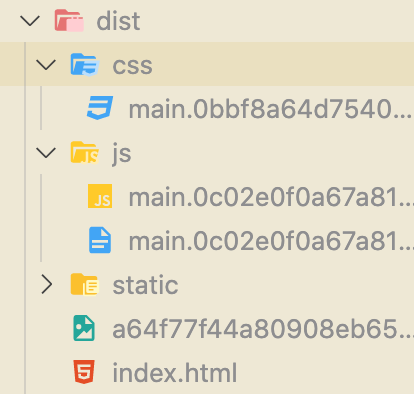
# 3.1 打包后js、css分文件夹放置
How can I bundle Javascript and CSS files to a specific folder with Webpack? (opens new window)
设置MiniCssExtractPlugin filename属性 "css/style.css"
new MiniCssExtractPlugin({
  filename: 'css/[name].[hash].css'
}),
2
3
# 3.2 指定打包输出目录
output: {
  clean: true,
  path: path.resolve(__dirname, './dist'),
  filename:
    (process.env.publicPath ?? '') + 'js/[name].[contenthash].bundle.js',
  publicPath: '/'
},
plugins: [
  new MiniCssExtractPlugin({
    filename:
      (process.env.publicPath ?? '') + 'css/[name].[contenthash].css'
  }),
]
// 以上会将js和css文件夹放置在设定好的publicPath目录下
2
3
4
5
6
7
8
9
10
11
12
13
14
# 3.3 css分离-MiniCssExtractPlugin
webpack doc (opens new window)
mini-css-extract-plugin和style-loader不要同时使用
https://stackoverflow.com/questions/55678211/using-mini-css-extract-plugin-and-style-loader-together
While developing, using
style-loaderis faster than extracting the styles each time. But in production, you should extract the styles in separate files to avoid the loading glitch in your web, when the styles load after the HTML, and you see your page without styles for a moment.在开发时,使用
style-loader比每次提取样式都快。但是在生产中,您应该将样式提取到单独的文件中,以避免 Web 中的加载故障,当样式在 HTML 之后加载时,您会暂时看到没有样式的页面。
style-loader的作用是将css插入到style标签中,作为行内样式
而生产环境我们一般通过stylesheet样式表来加载
{
  test: /\.css$/,
  use: [
    process.env.NODE_ENV !== 'production' ? 'style-loader' : MiniCssExtractPlugin.loader,
    'css-loader',
    'postcss-loader'
  ]
},
2
3
4
5
6
7
8
# 3.4 分离 app(应用程序) 和 vendor(第三方库) 入口(分包)
vendor的意思是依赖的第三方库,不会经常变更的,如你代码里的jQuery这种
CommonsChunkPlugin是指被你重复引用的chunks。可能是vendor,也可能是你自己的某个公共组件
# In webpack4
webpack.config.js
module.exports = {
  entry: {
    main: './src/main.js',
    vendor: ['vue', path.resolve(__dirname, '../src/splitChunk.js')],
  },
};
// splitChunk.js 会单独打包进vendor.js
// 如果打包的资源中有引入 'vue' 或 'splitChunk.js',则最终生成的main.bundle.js中也会包含splitChunk.js的代码,导致重复
// 如何优化?
// 使用splitChunk,不设置多entry
2
3
4
5
6
7
8
9
10
webpack.prod.js
module.exports = {
  output: {
    clean: true,
    path: path.resolve(__dirname, './dist'),
    filename: 'js/[name].[contenthash].bundle.js'
  },
};
2
3
4
5
6
7
# Tip
在 webpack < 4 的版本中,通常将 vendor 作为一个单独的入口起点添加到 entry 选项中,以将其编译为一个单独的文件(与
CommonsChunkPlugin结合使用)。而在 webpack 4 中不鼓励这样做。而是使用
optimization.splitChunks(opens new window) 选项,将 vendor 和 app(应用程序) 模块分开,并为其创建一个单独的文件。不要 为 vendor 或其他不是执行起点创建 entry。
# In webpack5
optimization.splitChunks (opens new window)
module.exports = {
  //...
  optimization: {
    splitChunks: {
      // 表示选择哪些 chunks 进行分割,可选值有:async,initial和all
      chunks: 'async',
      // 表示新分离出的chunk必须大于等于minSize,默认为30000,约30kb。
      minSize: 20000,
      minRemainingSize: 0,
      // 表示一个模块至少应被minChunks个chunk所包含才能分割。默认为1。
      minChunks: 1,
      // 表示按需加载文件时,并行请求的最大数目。默认为30。
      maxAsyncRequests: 30,
      // 表示加载入口文件时,并行请求的最大数目。默认为30。
      maxInitialRequests: 30,
      enforceSizeThreshold: 50000,
      // cacheGroups 下可以可以配置多个组,每个组根据test设置条件,符合test条件的模块,就分配到该组。模块可以被多个组引用,但最终会根据priority来决定打包到哪个组中。默认将所有来自 node_modules目录的模块打包至vendors组,将两个以上的chunk所共享的模块打包至default组。
      cacheGroups: {
        defaultVendors: {
          test: /[\\/]node_modules[\\/]/,
          priority: -10,
          reuseExistingChunk: true,
        },
        default: {
          minChunks: 2,
          priority: -20,
          reuseExistingChunk: true,
        },
      },
    },
  },
};
2
3
4
5
6
7
8
9
10
11
12
13
14
15
16
17
18
19
20
21
22
23
24
25
26
27
28
29
30
31
32
# 3.5 DllPlugin
DllPlugin和DllReferencePlugin用某种方法实现了拆分 bundles,同时还大幅度提升了构建的速度。"DLL" 一词代表微软最初引入的动态链接库。
什么是dll?
https://www.cnblogs.com/skychx/p/webpack-dllplugin.html
dll 其实就是缓存
# 4.static 静态资源不参与打包
首先需要知道的是静态资源没被import的话是不会参与打包的,所以我们要做的是将资源copy到dist目录下
# CopyWebpackPlugin
webpack doc (opens new window)
const CopyPlugin = require("copy-webpack-plugin");

module.exports = {
  plugins: [
    new CopyPlugin({
      patterns: [
        {
          from: path.resolve(__dirname, '../static'),
         	to: path.resolve(__dirname, '../dist/static')
        },
        { from: "other", to: "public" },
      ],
    }),
  ],
};
// from是指不打包的文件夹的相对路径。   to指向最后放置的文件夹路径
2
3
4
5
6
7
8
9
10
11
12
13
14
15
16
# webpack hash哈希值
https://www.jianshu.com/p/b83f4a046399
contenthash表示由文件内容产生的hash值,内容不同产生的contenthash值也不一样。
# hash
chunkhash,从字面上就能猜出它是跟webpack打包的chunk相关的。具体来说webpack是根据入口entry配置文件来分析其依赖项并由此来构建该entry的chunk,并生成对应的hash值。不同的chunk会有不同的hash值。一般在项目中把公共的依赖库和程序入口文件隔离并进行单独打包构建,用chunkhash来生成hash值,只要依赖公共库不变,那么其对应的chunkhash就不会变,从而达到缓存的目的。
一般在项目中对webpack的entry使用chunkhash,具体表现在output配置项上:
# chunkhash
# contenthash
contenthash表示由文件内容产生的hash值,内容不同产生的contenthash值也不一样。
# webpack module、chunk、bundle
# Webpack分包/外部化依赖
# 1.externals配置
module.exports = {
  // ... 其他配置
  externals: {
    vue: 'Vue',
    'element-plus': 'ElementPlus',
  },
};
2
3
4
5
6
7
通过上面的配置,Webpack 不会将 vue 和 element-plus 打包进生成的文件中,而是依赖于全局的 Vue 和 ElementPlus。
你需要在 HTML 中通过 CDN 引入对应的库。例如:
<script src="https://cdn.jsdelivr.net/npm/vue@3.2.47/dist/vue.global.prod.js"></script>
<script src="https://cdn.jsdelivr.net/npm/element-plus/dist/index.full.min.js"></script>
2
如果你的项目是不能联网的,这时候无法使用CDN服务,我们一般会通过copy-webpack-plugin将对应资源copy至指定目录
在使用externals 和 copy-webpack-plugin 后,Vue 和 Vue Router 的代码不会被打包到你的项目中,因为它们被定义为外部依赖,需要在 HTML 中手动引入。这种方式通过减少打包体积、提高构建速度来优化性能,但也意味着你需要手动在 HTML 文件中添加相应的 <script> 标签。
# 遇到的问题
报错Uncaught TypeError: Illegal constructor
# 2.SplitChunksPlugin 将依赖打包成单独文件
也可以不使用CDN或script标签引入的方式,而是使用Webpack来将依赖包打成单独文件,或将几个依赖打到一个文件中
module.exports = {
  // ... 其他配置
  optimization: {
    splitChunks: {
      chunks: 'all',
      cacheGroups: {
        vendor: {
          test: /[\\/]node_modules[\\/](vue|element-plus)[\\/]/,
          name: 'vendors',
          chunks: 'all',
        },
      },
    },
  },
};
2
3
4
5
6
7
8
9
10
11
12
13
14
15
← 如何使用PostCSS SvgIcon组件 →