什么是Vuex?
Vuex 是一个专为 Vue.js 应用程序开发的状态管理模式。它采用集中式存储管理应用的所有组件的状态,并以相应的规则保证状态以一种可预测的方式发生变化。
# State
新建仓库
import Vue from 'vue'
import Vuex from 'vuex'

Vue.use(Vuex)

export default new Vuex.Store({
  state: {
    name: 'vuex123'
  },
  mutations: {},
  actions: {},
  modules: {}
})
1
2
3
4
5
6
7
8
9
10
11
12
13如果希望通过
this.$store访问,需要在Vue实例上挂载store//main.js new Vue({ el: '#app', store: store, })1
2
3
4
5修改state
# mapState
用于将状态映射为组件计算属性,可以和组件的计算属性混合。
computed: {
  localComputed () { /* ... */ },
  // 使用对象展开运算符将此对象混入到外部对象中
  ...mapState({
    // ...
  })
}
1
2
3
4
5
6
7
2
3
4
5
6
7
computed: {
  // 映射 name(){ return this.$store.state.name }
  ...mapState(['name']),
  // 映射sex(){ return this.$store.state.sex }
  //myAge(){ return this.$store.state.age }
  ...mapState({
    sex: state => 'female' ?? state.sex,
    myAge:'age'
  }),
  ...mapGetters(['nameGetter'])
},
1
2
3
4
5
6
7
8
9
10
11
2
3
4
5
6
7
8
9
10
11
# getter
store 中定义“getter”(可以认为是 store 的计算属性)
getters: {
  // ...
  getTodoById: (state) => (id) => {
    return state.todos.find(todo => todo.id === id)
  },
  getUserName: (state) =>
}
1
2
3
4
5
6
7
8
2
3
4
5
6
7
8
# Mutation
mutations ------ 专门用于存放修改state的方法
//User.vue
输入值:<input @input="increment" type="text" />
    数字:
    <span>{{ $store.state.msg }}</span>

methods: {
  increment(e) {
    this.$store.commit("increment", e.target.value)
    console.log(e)
  }
}
1
2
3
4
5
6
7
8
9
10
11
2
3
4
5
6
7
8
9
10
11
//Store/index.js
export default new Vuex.Store({
  state: {
    name: 'vuex123',
    msg: ''
  },
  mutations: {
    increment(state, value) {
      // 变更状态
      state.msg = value
    }
  },
  strict: true
})
1
2
3
4
5
6
7
8
9
10
11
12
13
14
2
3
4
5
6
7
8
9
10
11
12
13
14
注意: mutations中第一个参数永远是state,此外,额外参数最多只能传一个;如果需要传多个参数,请传入一个对象。
另外mutation必须同步执行,如果需要异步执行,使用action
# Action
action接收两个参数*(context: object,payload)*
Mutation 通过 store.commit触发:
store.commit('increment', 10)
1
Action 通过 store.dispatch 方法触发:
store.dispatch('increment')
1
Action 类似于 mutation,不同在于:
- Action 提交的是 mutation,而不是直接变更状态。
- Action 可以包含任意异步操作。
mutations:{
  [SET_STATUS](state, data) {
      state.status = data
    },
}
actions:{
  setStatusAsync({ commit }, value) {
      setTimeout(() => {
        commit(SET_STATUS, value)
      }, 2000)
    },
}
// dispatch actions
$store.dispatch('setStatusAsync', 123)
1
2
3
4
5
6
7
8
9
10
11
12
13
14
2
3
4
5
6
7
8
9
10
11
12
13
14
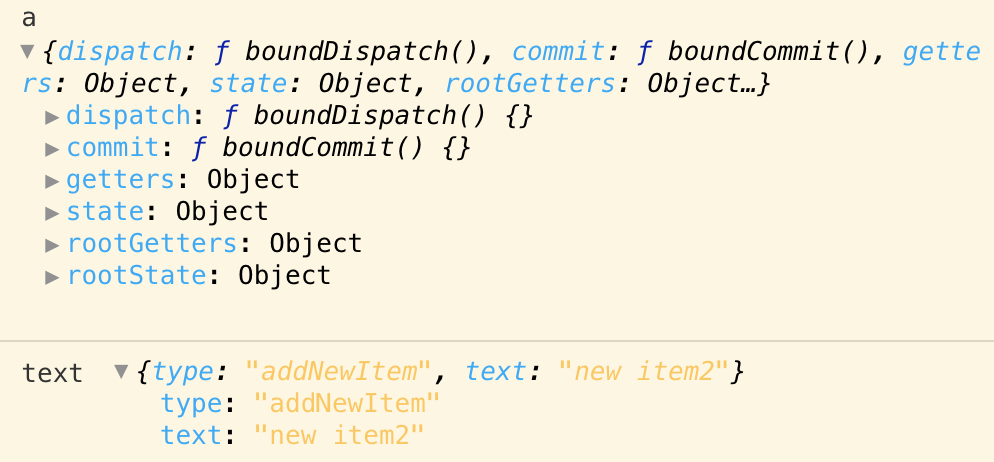
# 以载荷形式分发action
// 载荷形式
store.dispatch('addNewItem', text);

// store.js
  actions: {
    // 载荷形式
    addNewItem(a, text) {
      console.log('a', a);
      console.log('text', text);

      // commit(ADD_NEW_ITEM, text);
    }
  }
1
2
3
4
5
6
7
8
9
10
11
12
13
2
3
4
5
6
7
8
9
10
11
12
13
打印结果:
# 以对象形式分发action
// 对象形式
    store.dispatch({
      type: 'addNewItem',
      text: text
    });

// store.js
actions: {
    // 对象形式
    addNewItem(o,b) {
      console.log(o,b);
      // commit(ADD_NEW_ITEM, text);
    }
  }
1
2
3
4
5
6
7
8
9
10
11
12
13
14
2
3
4
5
6
7
8
9
10
11
12
13
14
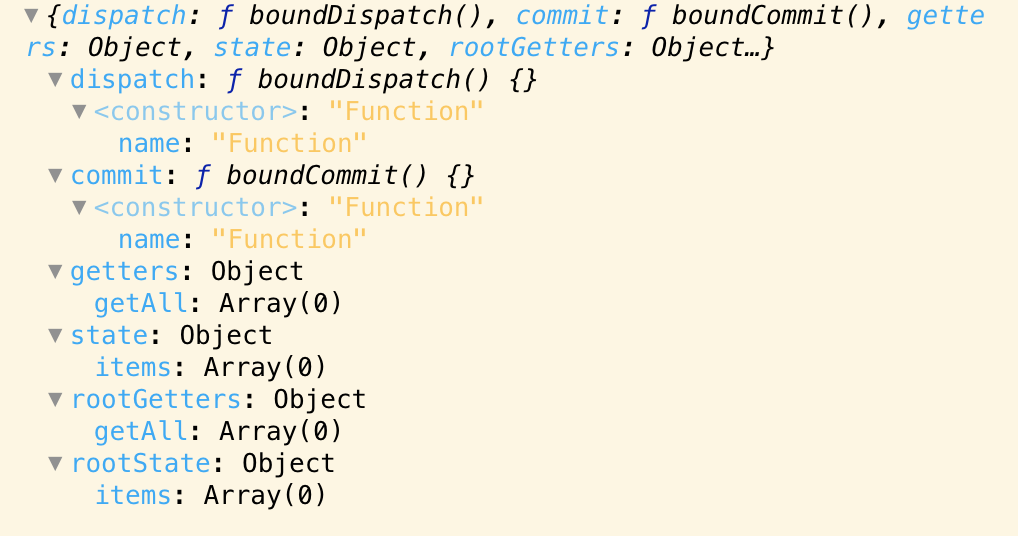
打印结果:

打印o:
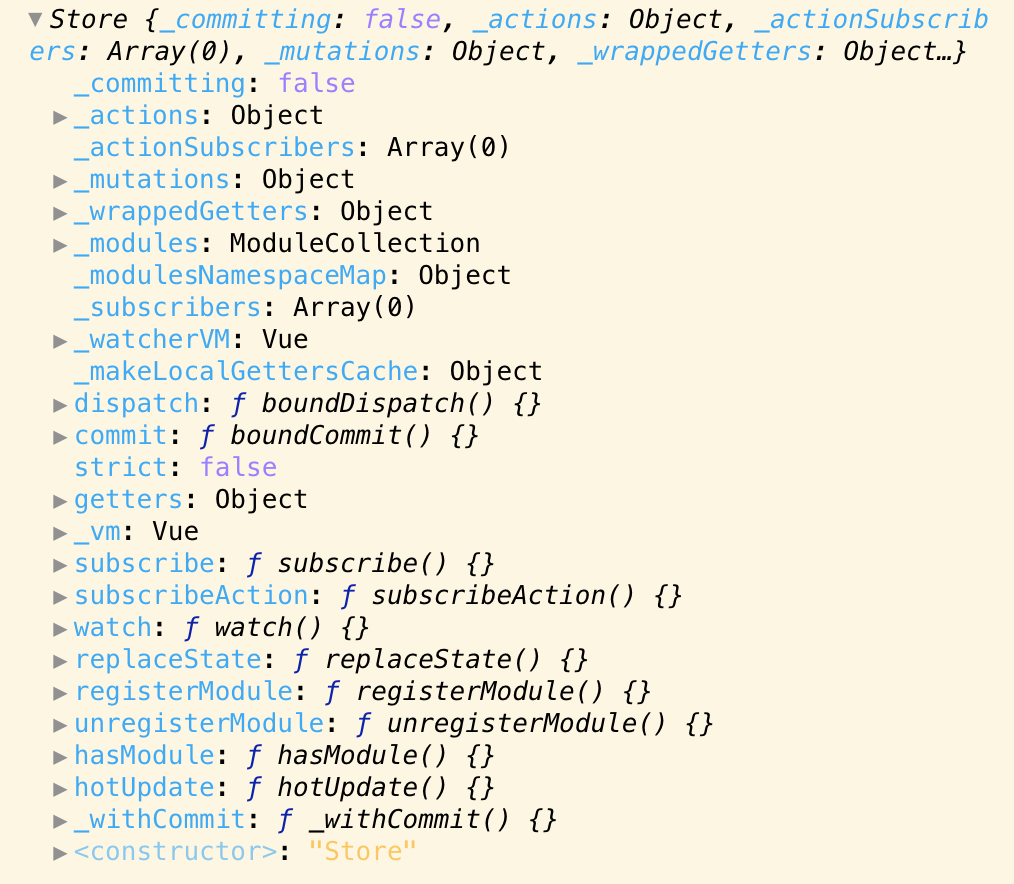
再看看完整的Store实例:
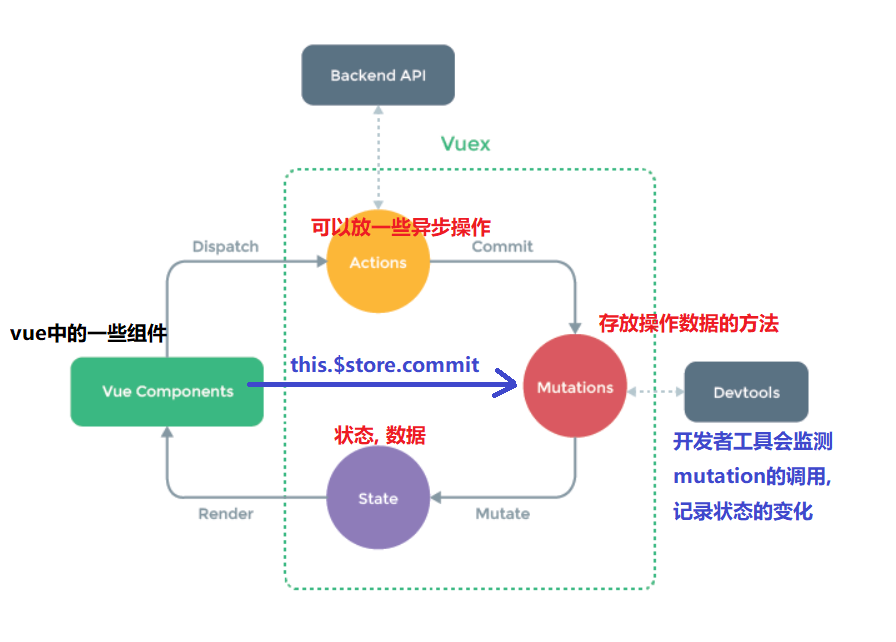
数据变更流程
# Vuex配合localStorage数据持久化
mutation的方法更新state里面的数据,顺便更新localStorage。
这样在强制刷新页面后,先从localStorage中读取数据,存到Vuex。
localStorage的读取性能没Vuex好,因为localStorage是读磁盘,Vuex是读内存。
const state = {
  userinfo: {
    addressArray: JSON.parse(localStorage.getItem('userinfo'))?.addressArray || [],
    chinaAreaData: JSON.parse(localStorage.getItem('userinfo'))?.chinaAreaData || []
  }
}

const getters = {
  userinfo: (state) => (state.userinfo)
}

const mutations = {
  GET_USERINFO: (state) => (state.userinfo),

  SET_USERINFO: (state, payload) => {
    state.userinfo =
      payload && localStorage.setItem('userinfo', JSON.stringify(payload))
  }
}

const actions = {
  getUserInfo({ commit }) {
    const userinfo = commit('GET_USERINFO')
    return userinfo
  },
  setUserInfo({ commit }, payload) {
    commit('SET_USERINFO', payload)
  }
}

export default {
  state,
  getters,
  mutations,
  actions
}
1
2
3
4
5
6
7
8
9
10
11
12
13
14
15
16
17
18
19
20
21
22
23
24
25
26
27
28
29
30
31
32
33
34
35
36
2
3
4
5
6
7
8
9
10
11
12
13
14
15
16
17
18
19
20
21
22
23
24
25
26
27
28
29
30
31
32
33
34
35
36