# Nginx目录结构
https://developer.aliyun.com/article/704954
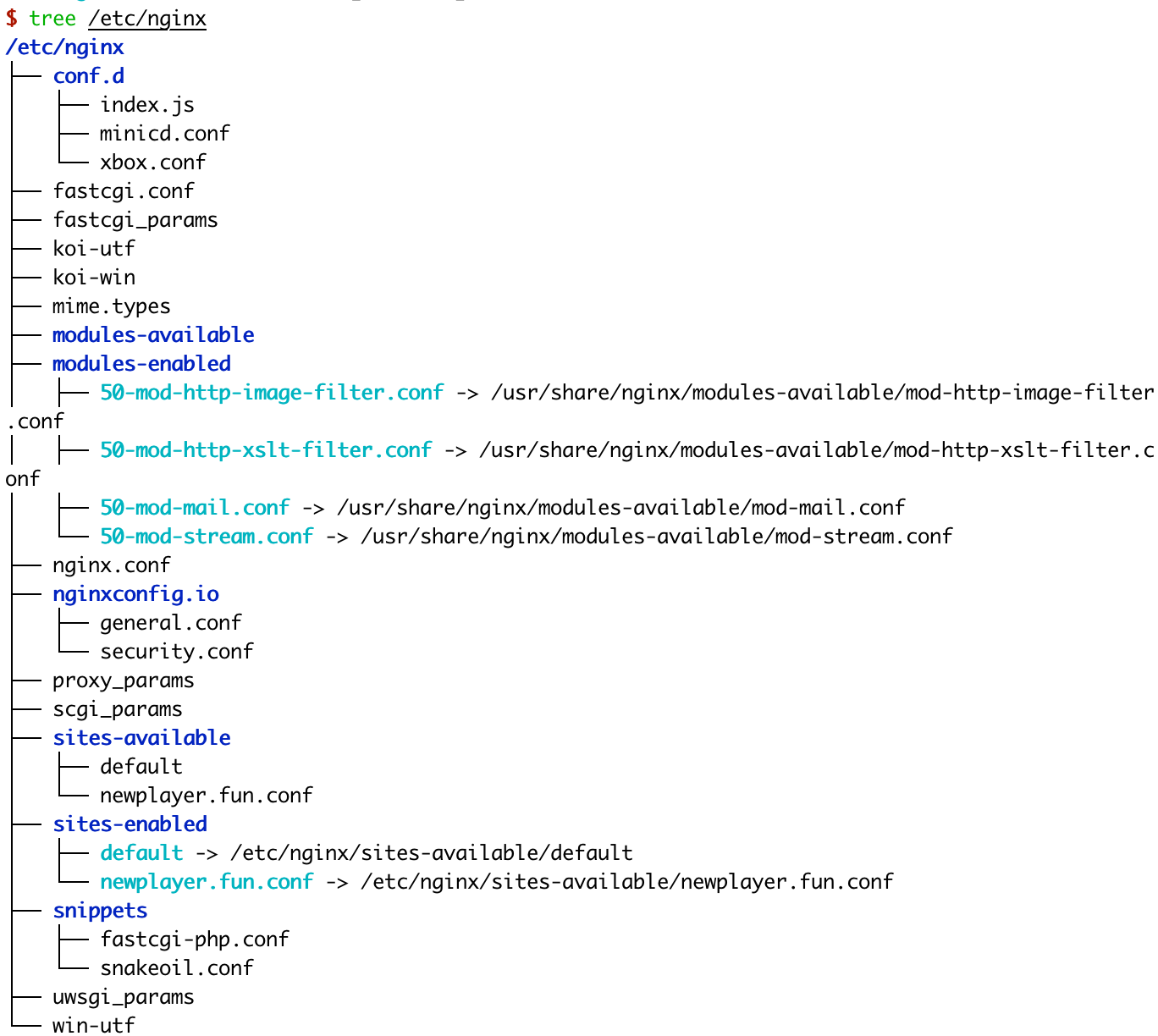
/etc/nginx/sites-enabled
目录存储生效的"server blocks"配置. 通常, 这个配置都是链接到sites-available目录中的配置文件.
默认在 /etc/nginx/nginx.conf 配置文件中会有如下配置:
http {
    ......
    ##
    # Virtual Host Configs
    ##

    include /etc/nginx/conf.d/*.conf;
    include /etc/nginx/sites-enabled/*;
}
2
3
4
5
6
7
8
9
这表明默认情况下 nginx 会自动包含 /etc/nginx/conf.d/*.conf 和 /etc/nginx/sites-enabled/*。
# 使用site-available/site-enabled 还是 conf.d ?
site-available vs conf.d (opens new window)
# Nginx 配置详解
Nginx配置详解:https://www.runoob.com/w3cnote/nginx-setup-intro.html
Nginx全配置:https://www.nginx.com/resources/wiki/start/topics/examples/full/
nginx配置:https://zhuanlan.zhihu.com/p/31202053
user       www www;  ## Default: nobody
worker_processes  5;  ## Default: 1 允许生成的进程数,默认为1
error_log  logs/error.log; # 错误日志 <FILE>    <LEVEL>:[debug|info|notice|warn|error|crit|alert|emerg],级别越高记录的信息越少。
pid        logs/nginx.pid; # 指定nginx进程运行文件存放地址
worker_rlimit_nofile 8192;

events {
  worker_connections  4096;  ## Default: 1024
}

http {
  # http全局设置
  include    conf/mime.types;
  include    /etc/nginx/proxy.conf;
  include    /etc/nginx/fastcgi.conf;
  index    index.html index.htm index.php;

  default_type application/octet-stream;
  log_format   main '$remote_addr - $remote_user [$time_local]  $status '
    '"$request" $body_bytes_sent "$http_referer" '
    '"$http_user_agent" "$http_x_forwarded_for"';
  access_log   logs/access.log  main;
  sendfile     on;
  tcp_nopush   on;
  server_names_hash_bucket_size 128; # this seems to be required for some vhosts

  server { # php/fastcgi
    listen       80;
    server_name  domain1.com www.domain1.com;
    access_log   logs/domain1.access.log  main;
    root         html; # 根目录,如果location没有指定,就往外层的server和http寻找

    location ~ \.php$ {
      fastcgi_pass   127.0.0.1:1025;
    }
  }

  server { # simple reverse-proxy
    listen       80;
    server_name  domain2.com www.domain2.com;
    access_log   logs/domain2.access.log  main;

    # serve static files
    location ~ ^/(images|javascript|js|css|flash|media|static)/  {
      root    /var/www/virtual/big.server.com/htdocs;
      expires 30d;
    }

    # pass requests for dynamic content to rails/turbogears/zope, et al
    location / {
      proxy_pass      http://127.0.0.1:8080;
    }
  }

  upstream big_server_com {
    server 127.0.0.3:8000 weight=5;
    server 127.0.0.3:8001 weight=5;
    server 192.168.0.1:8000;
    server 192.168.0.1:8001;
  }

  server { # simple load balancing
    listen          80;
    server_name     big.server.com;
    access_log      logs/big.server.access.log main;

    location / {
      proxy_pass      http://big_server_com;
    }
  }
}
2
3
4
5
6
7
8
9
10
11
12
13
14
15
16
17
18
19
20
21
22
23
24
25
26
27
28
29
30
31
32
33
34
35
36
37
38
39
40
41
42
43
44
45
46
47
48
49
50
51
52
53
54
55
56
57
58
59
60
61
62
63
64
65
66
67
68
69
70
71
- 1、全局块:配置影响nginx全局的指令。一般有运行nginx服务器的用户组,nginx进程pid存放路径,日志存放路径,配置文件引入,允许生成worker process数等。
- 2、events块:配置影响nginx服务器或与用户的网络连接。有每个进程的最大连接数,选取哪种事件驱动模型处理连接请求,是否允许同时接受多个网路连接,开启多个网络连接序列化等。
- 3、http块:可以嵌套多个server,配置代理,缓存,日志定义等绝大多数功能和第三方模块的配置。如文件引入,mime-type定义,日志自定义,是否使用sendfile传输文件,连接超时时间,单连接请求数等。
- 4、server块:配置虚拟主机的相关参数,一个http中可以有多个server。
- 5、location块:配置请求的路由,以及各种页面的处理情况。
# server块
server {

    listen       80; #监听端口
  	# listen [::]:80; # 监听ipv6
    server_name  t-industrygraph.aigauss.com; #监听地址

   	# 监听 127.0.0.1:80
    location / {
        #root path #根目录
        root   /usr/share/nginx/html;
        index  index.html index.htm;
        # try_files file ... uri
        # try_files的作用: https://www.hi-linux.com/posts/53878.html
        # $uri/ 是为了访问一个目录路径时,同时去匹配目录下的索引页,即 访问127.0.0.1/images/ 会去访问  127.0.0.1/images/index.html
        # $url === $document_root 此处是/usr/share/nginx/html 目录
        try_files $uri $uri/ /index.html;
    }

    #
    error_page   500 502 503 504  /50x.html;
    location = /50x.html {
        root   html;
    }

}
2
3
4
5
6
7
8
9
10
11
12
13
14
15
16
17
18
19
20
21
22
23
24
25
server {
	listen 3000;
	# listen [::]:80;	# 监听ipv6

	server_name newplayer.fun;
	root /var/www/vuepress/public;

	# security
	include nginxconfig.io/security.conf;

	# index.html fallback
	location / {
		try_files $uri $uri/ /index.html;
	}

	# additional config
	include nginxconfig.io/general.conf;
}

# subdomains redirect
server {
	listen 8888:80;
	listen [::]:80;

	server_name *.newplayer.fun;

	return 301 http://newplayer.fun$request_uri;
}
2
3
4
5
6
7
8
9
10
11
12
13
14
15
16
17
18
19
20
21
22
23
24
25
26
27
28
29
30
# location块
location语法:
- 匹配 URI 类型,有四种参数可选,当然也可以不带参数。
- 命名location,用@来标识,类似于定义goto语句块。
location [ = | ~ | ~* | ^~ ] /URI { … }
location @/name/ { … }
2
# locaion匹配命令
| 参数 | 解释 |
|---|---|
空 | location 后没有参数直接跟着 标准 URI,表示前缀匹配,代表跟请求中的 URI 从头开始匹配。 |
= | 用于标准 URI 前,要求请求字符串与其精准匹配,成功则立即处理,nginx停止搜索其他匹配。 |
^~ | 用于标准 URI 前,并要求一旦匹配到就会立即处理,不再去匹配其他的那些个正则 URI,一般用来匹配目录 |
~ | 用于正则 URI 前,表示 URI 包含正则表达式, 区分大小写 |
~\* | 用于正则 URI 前, 表示 URI 包含正则表达式, 不区分大小写 |
@ | @ 定义一个命名的 location,@ 定义的locaiton名字一般用在内部定向,例如error_page, try_files命令中。它的功能类似于编程中的goto。 |
#禁止访问的文件或目录
location ~ ^/(\.user.ini|\.htaccess|\.git|\.svn|\.project|LICENSE|README.md)
{
    return 404;
}

#一键申请SSL证书验证目录相关设置
location ~ \.well-known{
    allow all;
}

location ~ .*\.(gif|jpg|jpeg|png|bmp|swf)$
{
    expires      30d;
    error_log /dev/null;
    access_log /dev/null;
}

location ~ .*\.(js|css)?$
{
    expires      12h;
    error_log /dev/null;
    access_log /dev/null;
}
2
3
4
5
6
7
8
9
10
11
12
13
14
15
16
17
18
19
20
21
22
23
24
try_files $uri $uri/ /index.html;作用:
$uri 这个是nginx的一个变量,存放着用户访问的地址,
比如:http://www.xxx.com/index.html, 那么$uri就是 /index.html
$uri/ 代表访问的是一个目录,比如:http://www.xxx.com/hello/test/ ,那么$uri/就是 /hello/test/
完整的解释就是:try_files 去尝试到网站目录读取用户访问的文件,如果第一个变量存在,就直接返回;
不存在继续读取第二个变量,如果存在,直接返回;不存在直接跳转到第三个参数上。
# location URI结尾带不带 /
关于 URI 尾部的 / 有三点也需要说明一下。第一点与 location 配置有关,其他两点无关。
- location 中的字符有没有
/都没有影响。也就是说/user/和/user是一样的。 - 如果 URI 结构是
https://domain.com/的形式,尾部有没有/都不会造成重定向。因为浏览器在发起请求的时候,默认加上了/。虽然很多浏览器在地址栏里也不会显示/。这一点,可以访问baidu (opens new window)验证一下。 - 如果 URI 的结构是
https://domain.com/some-dir/。尾部如果缺少/将导致重定向。因为根据约定,URL 尾部的/表示目录,没有/表示文件。所以访问/some-dir/时,服务器会自动去该目录下找对应的默认文件。如果访问/some-dir的话,服务器会先去找some-dir文件,找不到的话会将some-dir当成目录,重定向到/some-dir/,去该目录下找默认文件。可以去测试一下你的网站是不是这样的。
# root、alias指令用法和区别
https://cloud.tencent.com/developer/article/1535615
NGINX Alias vs Root (opens new window)
root
location ^~ /t2/ {
   root /var/www/wwwroot/web1/;
}
# 请求http://127.0.0.1/t/index.html, web服务器返回 /var/www/wwwroot/web1/t2/index.html;
2
3
4
alias
location ^~ /t/ {
 alias /www/root/html/new_t/;
}
# 请求http://127.0.0.1/t/index.html 时, web服务器会返回服务器上的/www/root/html/new_t/ 的文件
2
3
4
# proxy_pass
代理转发
在nginx中配置proxy_pass代理转发时,如果在proxy_pass后面的url加/,表示绝对根路径;如果没有/,表示相对路径,把匹配的路径部分也给代理走。
# 假设访问 http://127.0.0.1/proxy/test.html
location /proxy/ {
	proxy_pass http://127.0.0.1/;
}
# 代理http://127.0.0.1/proxy/ 到 http://127.0.0.1/test.html

location /proxy/ {
	proxy_pass http://127.0.0.1;
}
# 代理http://127.0.0.1/proxy/ 到 http://127.0.0.1/proxy/test.html

location /proxy/ {
	proxy_pass http://127.0.0.1/aaa/;
}
# 代理http://127.0.0.1/proxy/ 到 http://127.0.0.1/aaa/test.html
2
3
4
5
6
7
8
9
10
11
12
13
14
15
# error_log配置
https://blog.csdn.net/czlun/article/details/73251714
# Nginx正则表达式
~ 为区分大小写匹配 ~* 为不区分大小写匹配
!~和!~*分别为区分大小写不匹配及不区分大小写不匹配
# 应用
# nginx二级域名转发
https://www.jianshu.com/p/7297d4037f88
# nginx 打开文件目录
在location server 或 http段中加入
autoindex on; #打开目录浏览功能
#默认为on,显示出文件的确切大小,单位是bytes
#显示出文件的大概大小,单位是kB或者MB或者GB
autoindex_exact_size off;
#默认为off,显示的文件时间为GMT时间。
#改为on后,显示的文件时间为文件的服务器时间
autoindex_localtime on;
add_header Cache-Control no-store; #让浏览器不保存临时文件
2
3
4
5
6
7
8
# 访问不存在的页面时跳转到指定页面
比如我要访问192.168.0.123/123,是不存在的,访问时自动跳转到192.168.0.123,可以配置nginx实现
在server块上增加
if (!-e $request_filename) {
    rewrite ^/(.*)$ /index.html redirect;
	}
2
3
# 常见报错
# 1.找不到nginx.pid
nginx: [error] open() "/run/nginx.pid" failed (2: No such file or directory)
找不到nginx.pid的解决方法 (opens new window)
原因是:"var/run/nginx.pid"文件和/run/nginx.pid文件为空了。
这俩个文件保存的是nginx的pid。如果使用kill命令终止nginx会导致文件清空。
所以不要用kill 命令终止nginx
正常应该用nginx -s quit命令平滑停止
启动nginx使用
nginx -t
nginx -c [配置文件] # 默认/etc/nginx/nginx.conf
# 如果使用systemctl启动
先nginx -s quit
再systemctl start nginx
2
3
4
5
# 2.端口被占用
[emerg]: bind() to 0.0.0.0:80 failed (98: Address already in use)
nginx.service: Control process exited, code=exited status=1
nginx.service: Failed with result 'exit-code'.
Failed to start A high performance web server and a reverse proxy server.
2
3
大概率是端口被占用了。site-enable/default中的80端口。详见 (opens new window)
# Nginx add_header的使用
https://zhuanlan.zhihu.com/p/194397481
	location / {
		add_header test 111;
		expires 1h;
		try_files $uri $uri/ /index.html;
	}
2
3
4
5