# Flex布局 ---- 阮一峰教程 (opens new window)
https://zhuanlan.zhihu.com/p/25303493 (opens new window)
# 容器属性
以下6个属性设置在容器上。
- flex-direction ------------定义主轴方向row / column 横向或纵向
- flex-wrap ------------------是否换行 wrap / no-wrap
- flex-flow
- justify-content -------------- 定义主轴对齐方式
- align-items ------------------- 定义侧轴对齐方式
- align-content
# flex-direction
主轴方向 默认 row 即x轴横向
.container {
    flex-direction: row | row-reverse | column | column-reverse;
}
2
3
# flex-wrap
.box{
  flex-wrap: nowrap | wrap | wrap-reverse;
}
2
3
# flex-flow
flex-flow属性是flex-direction属性和flex-wrap属性的简写形式,默认值为row nowrap。
.box {
  flex-flow: <flex-direction> || <flex-wrap>;
}
2
3
# justify-content
justify-content属性定义了项目在主轴上的对齐方式。
分别为左对齐、右对齐、居中对齐、两边对齐、等边对齐
.box {
  justify-content: flex-start | flex-end | center | space-between | space-around;
}
2
3
# align-items
align-items属性定义项目在侧轴(交叉轴)上如何对齐。
起点对齐(上对齐)、终点对齐(下对齐)、剧中对齐、基线对齐、默认sketch占满整个高度
.box {
  align-items: flex-start | flex-end | center | baseline | stretch;
}
2
3
# align-items: stretch
作用是让所有 flex 子元素在「交叉轴」方向上自动拉伸,填满父容器。
# align-content
align-content属性定义了多根轴线的对齐方式。如果项目只有一根轴线,该属性不起作用。
.box {
  align-content: flex-start | flex-end | center | space-between | space-around | stretch;
}
2
3
# 解析flex属性
syntax:none | [ <'flex-grow'> <'flex-shrink'>? || <'flex-basis'> ]
该属性是一个简写
flex: 1;
/* 等效于 */
flex-grow: 1;
flex-shrink: 1;
flex-basis: 0;
2
3
4
5
https://zhuanlan.zhihu.com/p/39052660
# flex-grow
<number>负值无效,默认为0。
瓜分父盒子剩余的空间
# flex-shrink
当子项的基准空间(flex-basis)超过父盒子的宽度时,通过flex-shrink 进行吸收。
计算方式为 当前元素的基准空间(flex-basis)* flex-shrink / 所有子元素flex-basis * flex-shrink 之和 * 超出的空间
举个例子:
#box {
  display: flex;
  width: 200px;
  height: 200px;
}
.item:nth-child(1) {
  /* flex-grow: 1; */
  flex-shrink: 1;
  flex-basis: 40px;
}
.item:nth-child(2) {
  /* flex-grow: 2; */
  flex-shrink: 2;
  flex-basis: 60px;
}
.item:nth-last-child(1) {
  /* flex-grow: 3; */
  flex-shrink: 3;
  flex-basis: 200px;
}

3个子盒子的基准空间flex-basis 之和=300px,多出了100px
盒子1的收缩的空间 = 40*1/(40*1+60*2+200*3) * 100 = 5.26px, 盒子1的实际宽度 = 40-5.26=34.74px
以此类推,盒子2 = 60*2/(40*1+60*2+200*3) * 100 = 15.78px, 盒子2 width = 60-15.78=44.22px
2
3
4
5
6
7
8
9
10
11
12
13
14
15
16
17
18
19
20
21
22
23
24
flex-shrink不受flex-grow影响
# flex-basis
<width>width 值可以是 `` (opens new window); 该值也可以是一个相对于其父弹性盒容器主轴尺寸的
百分数(opens new window) 。负值是不被允许的。默认为auto。
指定flex元素在主轴方向上的初始大小。如果设置了值,则子项占用的空间为设置的值;如果没设置或者为 auto,那子项的空间为width/height 的值。
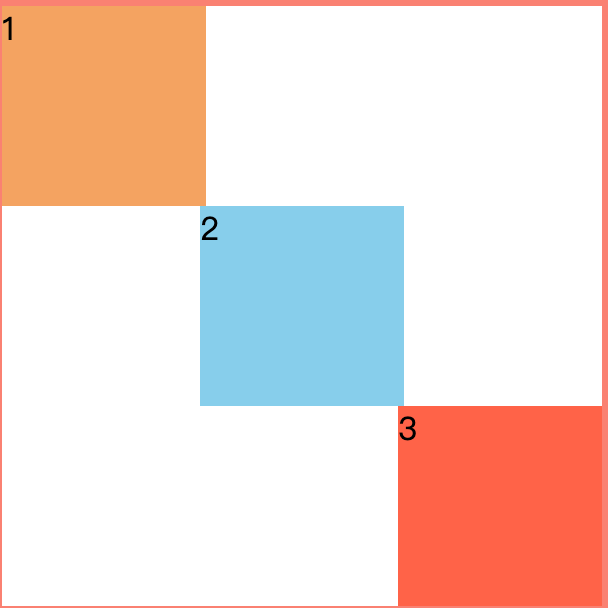
# flex布局等分盒子
<style>
* {
  margin: 0;
  padding: 0;
  box-sizing: border-box;
}
#box {
  width: 300px;
  height: 300px;
  border: 3px solid salmon;
  display: flex;
  flex-wrap: wrap;
}
.item {
  /* flex: 100%; */
  flex-basis: 100%;
}
.item:nth-child(1) {
  background-color: sandybrown;
  margin-right: 66%;
  width: 33%;
}
.item:nth-child(2) {
  background-color: skyblue;
  margin: 0 33% 0 33%;
}
.item:nth-child(3) {
  background-color: tomato;
  margin: 0 0 0 66%;
}
</style>
<div id="box">
  <div class="item">1</div>
  <div class="item">2</div>
  <div class="item">3</div>
</div>
2
3
4
5
6
7
8
9
10
11
12
13
14
15
16
17
18
19
20
21
22
23
24
25
26
27
28
29
30
31
32
33
34
35
36
最终结果
# 百分比布局
有5个等宽元素按照排列,一行只能排三个,现在要求第五个元素排在6的位置
使用百分比可以轻松解决
<div class="flex flex-wrap">
    <div class="w-1/3">1</div>
    <div class="w-1/3">2</div>
    <div class="w-1/3">3</div>
    <div class="w-1/3">4</div>
    <div class="w-1/3 ml-auto">5</div>
  </div>
2
3
4
5
6
7