Table of Contents generated with DocToc (opens new window)
# 1.props传值
https://cloud.tencent.com/developer/article/1090649
# 通过props向子组件传值
// App.vue
<template>
  <div id="test">
    <component-a
      :onOpen="handleOpen"
    ></component-a>
  </div>
</template>

  methods: {
    handleOpen(text) {
      console.log('onOpen')
      console.log(text)
    }
  },
2
3
4
5
6
7
8
9
10
11
12
13
14
15
// componentA.vue
<template>
  <div class="component-a" @click="myOpen(123)">
  </div>
</template>

  props: {
    myMsg: String,
    onSave: Function,
    onOpen: Function
  },

  methods: {
    myOpen(msg) {
      this.onOpen(msg)
    }
  }
2
3
4
5
6
7
8
9
10
11
12
13
14
15
16
17
# props验证
需要注意的是
Vue props验证中的自定义validator函数只是验证,返回值是布尔值,用这个布尔值来判断是否通过。函数内对值进行操作是无效的。
# 2.$emit
通过事件传值
vm.$emit( event, arg ) //触发当前实例上的事件
vm.$on( event, fn );//监听event事件后运行 fn;
语法:
子组件:$emit('event_name', payload)
父组件:@event_name=somevalue = payload 或者 $on('event_name',()=>{})
//从About.vue向App.vue传值

//App.vue
//html
<about @countChange="updateCount"></about>
<p>{{ mainCount }}</p>

//js
import About from "./views/About"
export default {
  name: "App",
  data() {
    return {
      // mainCount用来接收子组件传过来的参数count
      mainCount: 0
    }
  },
  methods: {
    updateCount(count) {
      this.mainCount = count
      console.log(count)
    }
  },
}
2
3
4
5
6
7
8
9
10
11
12
13
14
15
16
17
18
19
20
21
22
23
24
//About.vue
//html
<div class="about">
  <button @click="changeCount">Click {{ count }}</button>
</div>
//js
export default {
  data() {
    return {
      count: 0
    }
  },
  methods: {
    changeCount() {
      this.count++
      this.$emit("countChange", this.count)
    }
  }
}
2
3
4
5
6
7
8
9
10
11
12
13
14
15
16
17
18
19
# $emit的TypeScript 实现
function emit(this: Vue, event: string, ...args: unknown[]): void {
  const vm = this
  // 从实例的 _events 属性中获取指定事件的回调函数数组
  let cbs = vm._events[event]
  // 如果回调函数数组存在
  if (cbs) {
    // 遍历回调函数数组,依次调用每个回调函数,并将传入的参数传递给它
    cbs = cbs.length > 1 ? toArray(cbs) : cbs
    const info = `event handler for "${event}"`
    for (let i = 0, l = cbs.length; i < l; i++) {
      invokeWithErrorHandling(cbs[i], vm, args, vm, info)
    }
  }
  // 如果 $emit 调用时带有参数,则在实例的 _hasHookEvent 属性中记录事件名称
  const hook = vm._hookEvent
  if (hook) {
    vm.$emit(`hook:${hook}${event}`, ...args)
  }
  // 如果实例的 _parent 属性存在,则在父级 Vue 实例上触发相同的事件,并传递相同的参数
  const parent = vm.$parent
  if (parent && !isInBeforeCreateCycle(parent)) {
    parent.$emit(...(parent.$options.emits || []), event, ...args)
  }
}
2
3
4
5
6
7
8
9
10
11
12
13
14
15
16
17
18
19
20
21
22
23
24
this.$emit是经过封装了的emit
Vue.prototype.$emit = (event: string, ...args: unknown[]) =>
	emit(this: Vue, event: string, ...args: unknown[])
2
# Vue3的emit使用
defineEmits (opens new window)
import { defineEmits } from 'vue';

// 使用 defineEmits 来定义组件可以触发的自定义事件
const emit = defineEmits(['update:first', 'update:second']);

// 在组件的逻辑中触发自定义事件
const handleClick = () => {
  emit('update:first', '这是 update:first 事件的数据');
  emit('update:second', '这是 update:second 事件的数据');
};
2
3
4
5
6
7
8
9
10
# 3.通过provide/inject 注入
provide/inject 允许祖先组件向后代组件中注入一个依赖
https://codesandbox.io/s/vue2-provideinject-thmuz
Compostion api写法
<script>
import { inject, reactive, ref, useAttrs } from '@vue/composition-api'
export default {
  name: 'Child',
  setup(props, ctx) {
    const foo = inject('foo')
    console.log('foo: ', foo)
    return { foo }
  },
}
</script>
2
3
4
5
6
7
8
9
10
11
inject(key: string, defaultValue: any, treatDefaultAsFactory: boolean)
# Vue3中的provide/inject
export interface IGlobalConfig {
  name: string;
}

const globalConfig = reactive({
  name: 'name'
});
provide('globalConfig', globalConfig);
2
3
4
5
6
7
8
import { type IGlobalConfig } from '@/App.vue';
import { inject } from 'vue';
const globalConfig = inject<IGlobalConfig>('globalConfig');
2
3
# 4.事件总线EventBus(非父子)
EventBus其实就是一个新的Vue实例
//event-bus.js
import Vue from 'vue'

const EventBus = new Vue()

EventBus.$on('message', (data) => {
  console.log('get message', data)
})

export default EventBus
2
3
4
5
6
7
8
9
10
通过bus.$emit触发bus的事件
//About.vue向UserProfile.vue传递
<template>
	<button @click="handleEventBus">EventBus</button>
</template>

<script>
import EventBus, { handleEvent } from '@/store/eventbus'
export default {
  created() {
    EventBus.$on('message', handleEvent)
  },
  beforeDestroy() {
    // debugger
    EventBus.$off('message', handleEvent)
    console.log('销毁EventBus')
  },
  methods: {
    handleEventBus() {
      EventBus.$emit('message', { someData: 123 })
    }
  }
}
</script>
2
3
4
5
6
7
8
9
10
11
12
13
14
15
16
17
18
19
20
21
22
23
//UserProfile.vue
//html
<div class="user-profile">
  <h3>用户中心UserProfile</h3>
  我是兄弟组件: <span>{{ myMsg }}</span>
</div>

//js
import EventBus from "../event-bus"
export default {
  data() {
    return {
      myMsg: "Hi"
    }
  },
  mounted() {
    EventBus.$on("msgSend", this.sendMsg)
  },
  methods: {
    sendMsg(msg) {
      this.myMsg = msg
      console.log(msg)
    }
  },
  // 销毁eventbus
  beforeDestroy() {
    EventBus.$off("msgSend", () => console.log("eventbus已被销毁"))
  }
}
2
3
4
5
6
7
8
9
10
11
12
13
14
15
16
17
18
19
20
21
22
23
24
25
26
27
28
29
需要注意的是:EventBus 不会自动销毁,通常需要你手动调用 off 或类似的方法来移除事件监听器。
EventBus实例重用问题
EventBus 是在整个应用生命周期中只创建一次,当你调用 EventBus.$off 时,它会从全局事件总线上移除事件监听器,如果离开页面后再进入页面,就会导致你无法触发事件
eventbus存在问题 (opens new window),所以需要在使用完后手动销毁它,在beforDestory和destoryed中使用$off
vm.__patch__(vm._vnode, null)用来触发所有的destory钩子函数。
# EvevntBus、EventEmitter和Mitt
EventBus 是一种设计模式,通常用于前端应用中实现组件之间的通信。它可以基于 EventEmitter、Mitt 或其他事件管理工具实现。
Vue3中没有EventBus了,取而代之的是mitt
与Node 的 EventEmitter 具有 (opens new window)相同的名称和理念
Mitt 是专为浏览器开发的,它没有任何依赖项,并且支持 IE9+。
import mitt from 'mitt';

type Events = {
  message: object;
};

const Mitt = mitt<Events>();
Mitt.on('message', (data) => {
  console.log('get message', data);
});

export default Mitt;
2
3
4
5
6
7
8
9
10
11
12
<template>
  <span @click="handleEvents">child-a</span>
</template>

<script setup lang="ts">
import Mitt from '@/store/mitt';

const handleEvents = () => {
  Mitt.emit('message', { someData: 123 });
};
</script>
2
3
4
5
6
7
8
9
10
11
# $refs
this.$refs.[refValue] 用来直接访问一个已注册的组件
// Props传值
<template>
  <div id="app">
    <HelloWorld ref="hello" msg="Hello Vue in CodeSandbox!" />
  </div>
</template>

<script>
import HelloWorld from "./components/HelloWorld";

export default {
  name: "App",
  components: {
    HelloWorld,
  },
  mounted() {
    console.log(123);
    console.log(this.$refs.hello); // VueComponent组件实例
    console.log(this.$refs.hello.msg); // Hello Vue in CodeSandbox!
    // 通过ref操作dom
    console.log(this.$refs.hello.$refs.app.innerText); // 123
  },
};
</script>

// HelloWorld.vue
<template>
  <div class="hello">
    <div id="app" ref="app">123</div>
  </div>
</template>

<script>
export default {
  name: "HelloWorld",
  props: {
    msg: String,
  },
};
</script>
2
3
4
5
6
7
8
9
10
11
12
13
14
15
16
17
18
19
20
21
22
23
24
25
26
27
28
29
30
31
32
33
34
35
36
37
38
39
40
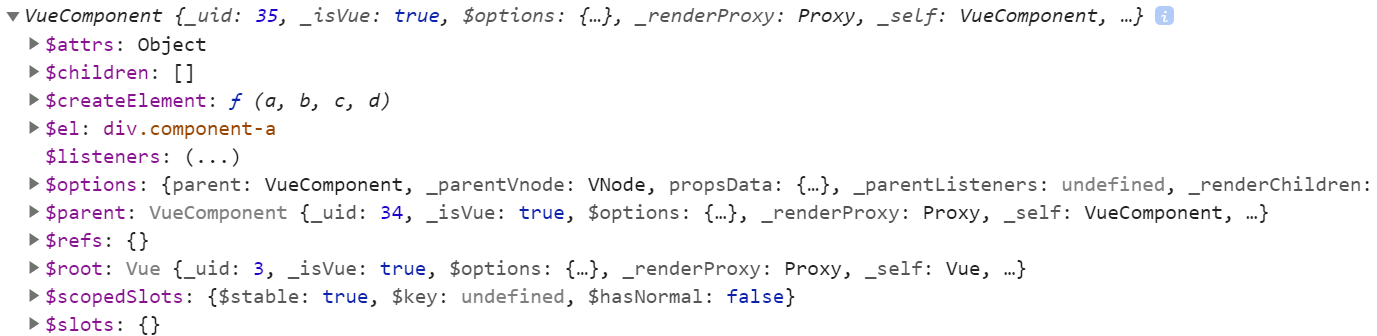
通过官方文档可以看到vm.$refs是一个对象,持有注册过 ref attribute (opens new window) 的所有 DOM 元素和组件实例。
所以只要给组件注册过ref属性,就可以通过vm.$refs来访问到该组件。
$refs只会在组件渲染完成之后生效,并且它们不是响应式的。这仅作为一个用于直接操作子组件的“逃生舱”——你应该避免在模板或计算属性中访问$refs。
# 谨慎使用 this.$refs
Why❓
- 组件必须是保持独立的,如果一个组件的 API 不能够提供所需的功能,那么这个组件在设计、实现上是有问题的。
- 组件的属性和事件必须足够的给大多数的组件使用。
https://www.kancloud.cn/donaf/vue/633895
Vue官方推荐通过ref来操作dom,而不是用原生js或jQuery
https://codesandbox.io/s/vue2-ref-57epd?file=/src/App.vue
# Vuex
store的几个属性
state:存放公共数据的地方 getter:获取根据业务场景处理返回的数据 mutations:唯一修改state的方法,修改过程是同步的 action:异步处理,通过分发操作触发mutation module:将store模块分割,减少代码臃肿
# $attrs
https://cn.vuejs.org/v2/guide/components-props.html#%E9%9D%9E-Prop-%E7%9A%84-Attribute
组件的根元素(即组件最外层元素)会继承attribute
<input type="date" class="form-control">
<bootstrap-date-input
  data-date-picker="activated"
  class="date-picker-theme-dark"
></bootstrap-date-input>
2
3
4
最后得到的class就是 form-control date-picker-theme-dark 。
默认开启属性继承
// App.vue
<template>
  <div class="learnvue">
    <base-input
      label="姓名"
      class="name-input"
      placeholder="请输入姓名"
      test-attrs="$attrs"
    ></base-input>
  </div>
</template>

<script>
import BaseInput from './components/BaseInput'
export default {
  name: 'learn-vue',
  components: {
    BaseInput
  }
}
</script>
2
3
4
5
6
7
8
9
10
11
12
13
14
15
16
17
18
19
20
21
// BaseInput.vue
<template>
  <label>
    {{ label }}- {{ $attrs.placeholder }}-
    <input v-bind="$attrs" />
  </label>
</template>

<script>
export default {
  props: {
    label: String
  },
  // inheritAttrs 属性继承
  // inheritAttrs: false,
  mounted() {
    console.log(this.$attrs)
  }
}
</script>
2
3
4
5
6
7
8
9
10
11
12
13
14
15
16
17
18
19
20
生成的dom结构:
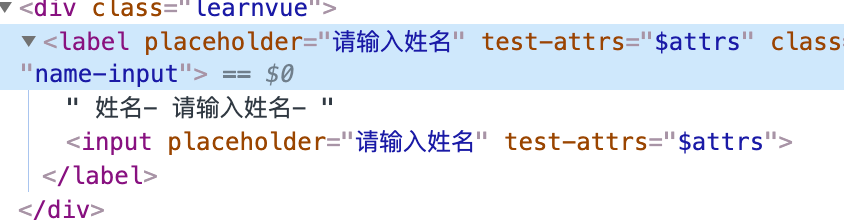
BaseInput输出:

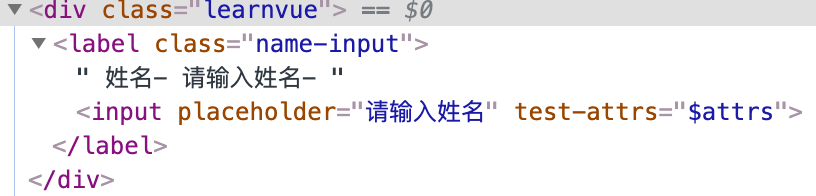
当设置 inheritAttrs: false 后
生成的dom结构即BaseInput输出:

- 2.4.0新增
- 类型
{ [key: string]: string } - 只读
- 详细
包含了父作用域中不作为
prop被识别 (且获取) 的特性绑定 (class和style除外)。当一个组件没有声明任何prop时,这里会包含所有父作用域的绑定 (class和style除外),并且可以通过v-bind="$attrs"传入内部组件——在创建高级别的组件时非常有用。 简单点讲就是包含了所以父组件在子组件上设置的属性(除了prop传递的属性、class和style)。